Color Palette Pro
An Experiment in Vibe Coding"Playing, but with a goal in mind..."
The Challenge
Every designer needs to consider color and good design often uses a limited palette to balance the needs for harmony and impact.
I wanted to play with "Vibe Coding". My goal was to see if I could produce the color palette editor I would want to use. A problem sufficiently rich that it would showcase good design whilst lacking external dependencies.
The Solution
Using Google AI Studio for the first time, I set about seeing what could be done - playing but with a goal in mind...
After a handful of prompts the potential seemed dazzling, pleasing UI and real functionality on request.
%
Vibe Coded
That's using English as your programming language. That doesn't mean that you don't need programming skills.
10 Hours
I was amazed at what the first 2 hours produced. The current functionality took less than 10 hours.
Developer Prompts
The current level of functionality was achieved in 35 prompts. A few mistakes - undo and refine the prompt. Bugs and 'randomness' introduced additional work with further prompts needed to fix them.
Features
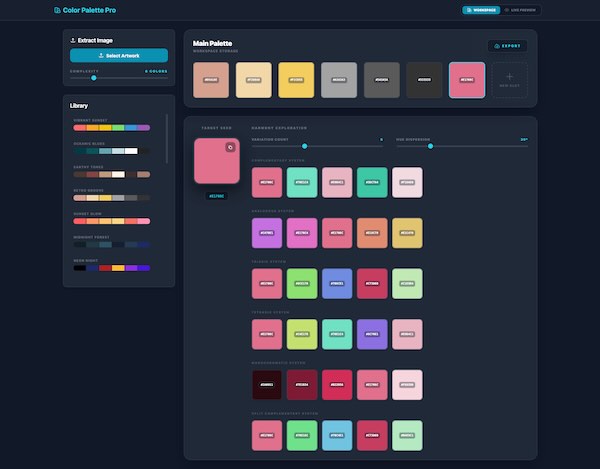
Main Workspace
Extract AI Optimised Palette
Upload your an image and the app will build a palette harmonious to those used.
Build Your Own Swatches
Build a set of color swatches from a library of presets, freely add, copy, rearrange and edit.
Instant Harmonies
Select any color and instantly get suggestions for a set of complementary, analogous, triadic harmonies.
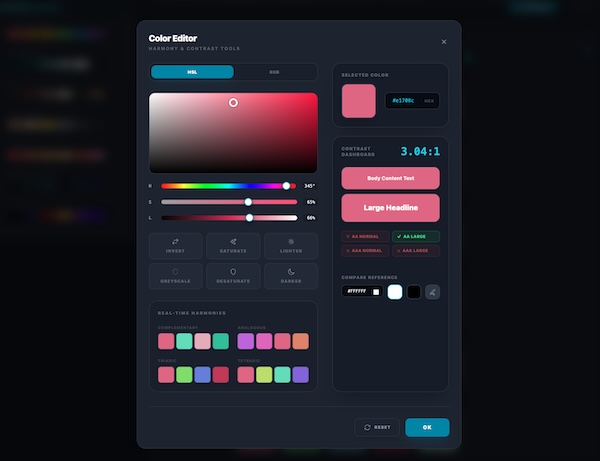
Color Editor
Color Space
Edit in HLS or RGB color spaces.
Check Contrast for Accessibility
Check the contrast ratio between your chosen and secondary colors, with:
- Numeric contrast value.
- Visual preview.
- Instant red/green feedback against Web Content Accessibility Guidelines (WCAG).
Tweak or Rethink
Fine tune by lightness or saturation, invert or consider harmonies. The choice is yours.
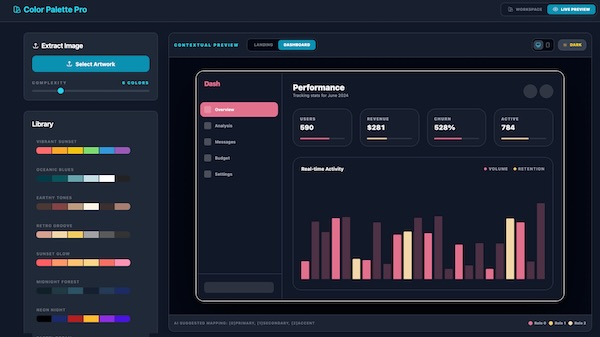
Live Preview
Light or Dark Mode
See how your color scheme will work in a UI, viewing in either light or dark mode.
Homepage or Dashboard
Previewing your UI, in the context of a mock landing page or dashboard.
Mobile or Desktop
Scale the example UI to fit desktop or mobile proportions.
The Results Were Amazing
You can count me impressed. From the first few prompts I had some useful functionality in place which looked polished on screen. Raw HTML, CSS, REACT, Typescript would have taken weeks to produce equivalent results.
- You may wish to finesse the UI design, but attractive UI is being generated by default.
- Experimentation comes at almost no cost. Answer those "what if..." questions by implementing them.
- You can "catch the wave" of inspiration as you seldom get bogged down in the intricasies of any one feature.
Observations
Overall it was a good experience, but it wasn't all plain sailing. A few observations I'd make for developers to consider.